Help Center - Alternative Version
  • Go to Help Center - Alternative Version
  • Get a Demo

Getting Started

  • Quick-Start Guide for Administrators
  • Video: Getting Started With Isora GRC (for administrators)
  • Customizing Isora GRC
  • Customizable Picklist Label Values
  • How-To: Log In to Isora GRC for the First Time
    • How-To: Change the Attributes of Locations
    • How-To: Add Locations
    • How-To: Add Organizational Data to Isora GRC
    • How-To: Add People and Define Their Roles
    • How-To: Assign Roles to a Unit
    • Customizing Notifications
    • FAQ: Isora GRC and LDAP
    • How-To: Create and Populate Asset Inventory Sheets
    • Customizable Picklist Label Values
    • How-To: Import Inventory
    • What Is a Vendor Product Status?
    • How-To: Add Custom Questions into Isora GRC
    • How-To: Create a New Policy and Tag Questions With It

Product Reference & How-To

  • How-To: Publish Findings From Assessments To the Risk Register
  • Cancelling or Deleting Assessments or Surveys: Overview and How-To
  • How-To: Create an Application Deployment
  • Reference & How-To: Working With Risk Register Custom Fields
  • What are assessment discussions?
    • Setup Related to Building Questionnaires
    • Setup: Notifications
    • Setup: Risks
    • Setup: People
    • Setup: Units
    • Setup: Locations
    • What is question tagging & what are policies?
    • The Settings Page
    • Organization
    • Setup

Help for Survey Participants

  • Survey Participants: Overview of Assessments with Isora GRC
  • Users: How-To: Complete Application Assessments
  • How Do I Enrich an Application?
  • How Do I Enrich Assets?
  • Users: How to Add Asset (Host) Inventory
  • Users: How to Delegate Questions
  • How-To: Fill Out a Survey Questionnaire

Looking for info about Isora Lite?

  • Updated: Isora Lite User Guide

FAQ

  • FAQ: What determines the ordering of questions?
  • FAQ: Which assessment methodology should I use?
  • FAQ: Isora GRC and LDAP
  • What is an assessment series?
  • What are question snapshots and why would I update them?
  • FAQ: How are scores calculated for questionnaires?
  • FAQ: How can I change my password in Isora GRC?
  • Isora Lite FAQ
  • FAQ: What is Asset Enrichment / Host Categorization?
  • FAQ: LDAP Login Error Message But I'm Not Using LDAP

Tutorials

  • Tutorial: Creating a New Risk Register Custom Field

Help for Assessment Managers

  • Users: How-To: Complete Application Assessments
  • How-To: Assign Roles to a Unit
  • How Do I Enrich an Application?
  • How Do I Enrich Assets?
  • Reference: Survey Launch Options
  • What is data enrichment?
  • What is a questionnaire template?
  • Working With Assessments (New UI)
  • Understanding Inventory
  • What is an assessment series?
  • How-To: Launch a Survey
  • What is delegation?
  • Reference: The Assessment Page
  • How-To: Assess an App / Application
  • Notifications: What Causes Them to Trigger?
  • How-To: Add an Application to Inventory
  • How-To: Fill Out a Survey Questionnaire

Release Notes

  • How-To: Identify Your Version of Isora GRC
  • January 12th, 2026
  • December 18th, 2025
  • December 3rd, 2025
  • November 17th, 2025
  • November 5th, 2025
  • October 20th, 2025
  • October 10th, 2025
  • October 9th, 2025
  • September 23, 2025
  • September 19, 2025
  • v1.4.4.1
  • v1.4.3.3
  • v1.4.3.2
  • v1.4.3.1
  • v1.4.3
  • v1.4.2
  • v1.4.1.1
  • v1.4.1
  • v1.4
  • v1.3.4
  • v1.3.3
  • v1.3.2
  • v1.3.1
  • v1.3
  • v1.2.1
  • v1.2
  • Legacy Release Notes

Help with 3rd-party vendor products

  • Third-Party Vendor Product Intake
  • Third-Party Vendor Product Deployments
  • Inventory: Working With Third-Party Vendor Products
  • Working With Third-Party Vendor Product Deployments (With Video)
  • How-To: Assess a Third-Party Vendor Product
  • Users: How-To: Add a Third-Party Vendor Product into Inventory
  • How-To: Create a Third-Party Vendor Product Deployment
  • Third Party Vendor Product Assessment: Overview and How-To
  • What Is a Vendor Product Status?
  • What Are Third-Party Vendor Products?
  • What are vendor contacts?

How to get more help

  • How to Get More Help

Powered by

  1. All collections
  2. Getting Started
  3. Product Configuration & Setup
  4. How-To: Add Locations

How-To: Add Locations

10 Dec 2025
·
2 min read
Was this page helpful?
How-To: Change the Attributes of Locations
Previous
How-To: Add Organizational Data to Isora GRC
Next

Powered by

    Only superusers can work with location data in Isora GRC.

    💡
    Note: Locations are an optional feature you can use to track the location of physical inventory. You may already be tracking this information using another tool besides Isora GRC.

    Using the New UI

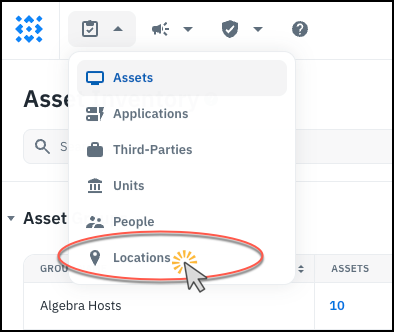
    1. On the Inventory menu, click Locations.
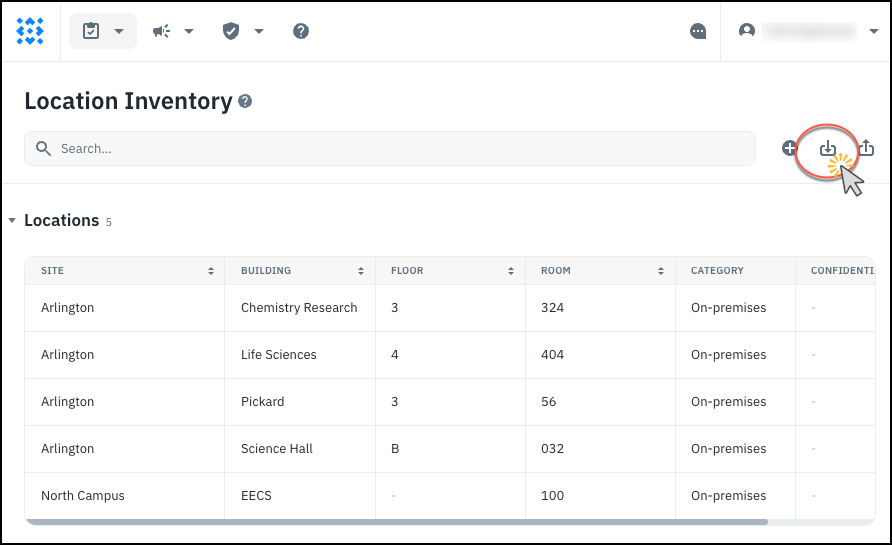
    1. To add multiple locations, click the Import button and upload a CSV. See also: Reference: Locations Reference: CSV Upload
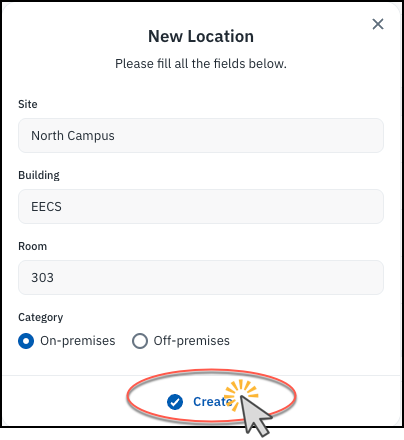
    1. To add a single location, click the + button instead. Then fill out the fields and click Create.
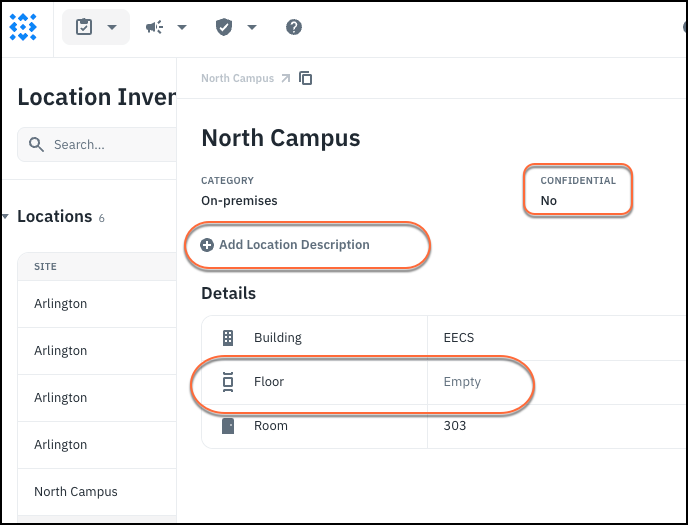
    1. After creating the location object, you can update the other fields (Confidential, Description, and Floor).
    1. Users will be able to reference these locations when entering location data on an asset.

    Using the Old UI

    1. Go to the Settings page and find Locations, under Organization.

    1. Use the upload button to upload a CSV of multiple locations.

      See also: Reference: Locations Reference: CSV Upload

    1. Alternatively, use the + sign to add a single location.

    1. Fill out the fields and click Save. The combination of Site, Building, Floor and Room must be unique.

    1. Later on, when you add inventory, the location information provided will be validated against locations which are specified here. Although the use of locations is optional, Isora GRC won’t add hosts to its database with invalid or incomplete location information (in other words, you can leave location fields blank on a host, or you can fill them in completely with valid location specifiers).

    See also: