Locations allow you to track where physical inventory assets are stored. If you want to use Isora GRC to track the locations of inventory, then you should add locations before you start adding assets to Isora GRC.
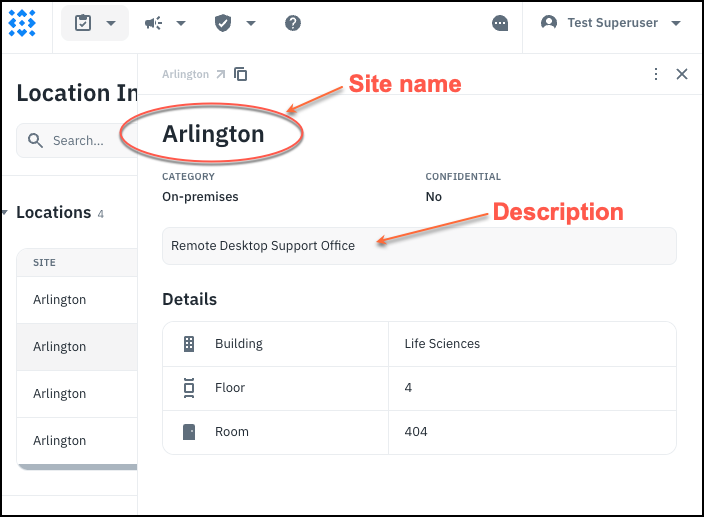
Location Fields
| Site | Name of the main location site |
|---|---|
| Category | On-premises or Off-premises |
| Confidential | Yes if this is a secret location |
| Description | Optional details about the location (particularly useful for off-premises locations) |
| Building | Building within the site |
| Floor | Floor number |
| Room | Specific room within the building |
You learn how to add locations here: How-To: Add Locations .
On-Premises versus Off-Premises Locations
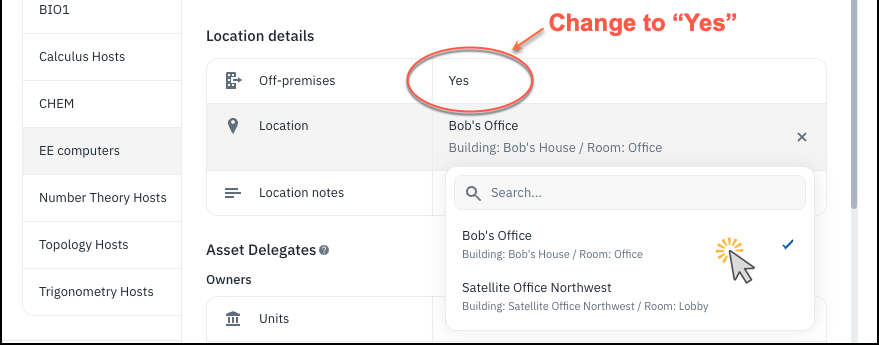
When a user wants to enter location data for an asset, by default assets are assumed to be on-premises. When they try to choose a location, only on-premises locations will be listed for them to choose. If they want to choose an off-premises location, they should first change the “Off-premises” attribute of the asset to “Yes” and then they can choose off-premises locations.
Confidential Locations
You may have locations that are need-to-know. These locations should have the confidential field set. Only superusers can see or select confidential locations. Ordinary users can see the location information for an asset that they have access to even if it’s confidential, but they can’t choose a confidential location from the drop-down.