Some unit assessments include asset enrichment, wherein assets in asset groups assigned to the assessed unit are classified based on data they contain. People who have Assessment Manager or IT Staff roles in the assessed unit can perform this asset enrichment.
How to view or edit asset delegates
From the Asset Inventory page, navigate to the asset by searching or by clicking through from the asset group to open the asset view sidebar and scroll down. Three different categories of asset delegates are shown- Owners, Users and IT Contacts. Within each of those categories, there can be a set of people and a set of units.
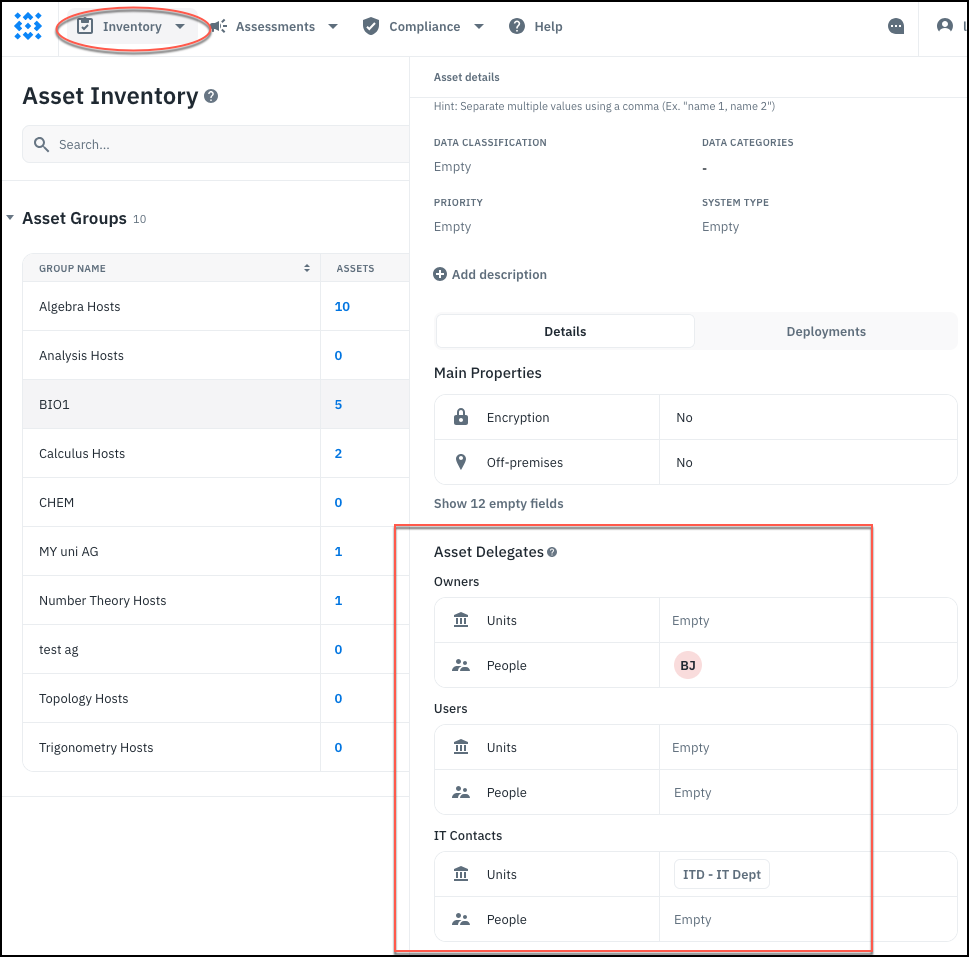
From the asset view sidebar, superusers and Assessment Managers or IT Staff of the owning unit (that is, the unit that owns the asset group where the asset resides), can view and edit these fields.
Owners, Users and IT Contacts can mean different things in your organization. From a functional point of view, within Isora GRC they are all equivalent; any person who is individually listed as an owner, user or IT contact, and anyone with an Assessment Manager, IT Staff, or Unit Head role in a unit that is a delegate, can enrich that asset.
Ordinary Users: How can I tell if I’m an asset delegate?
Ordinary users do not have the ability to view assets. You will know you’re a delegate when you get invited to participate in an assessment that includes an asset which you are delegated.